8. Plans and the free period
On this page: You compare the plans and change yours if you need to.
Compare and choose plans under "Plan" in the app's left menu. Charges appear on your Shopify bill.
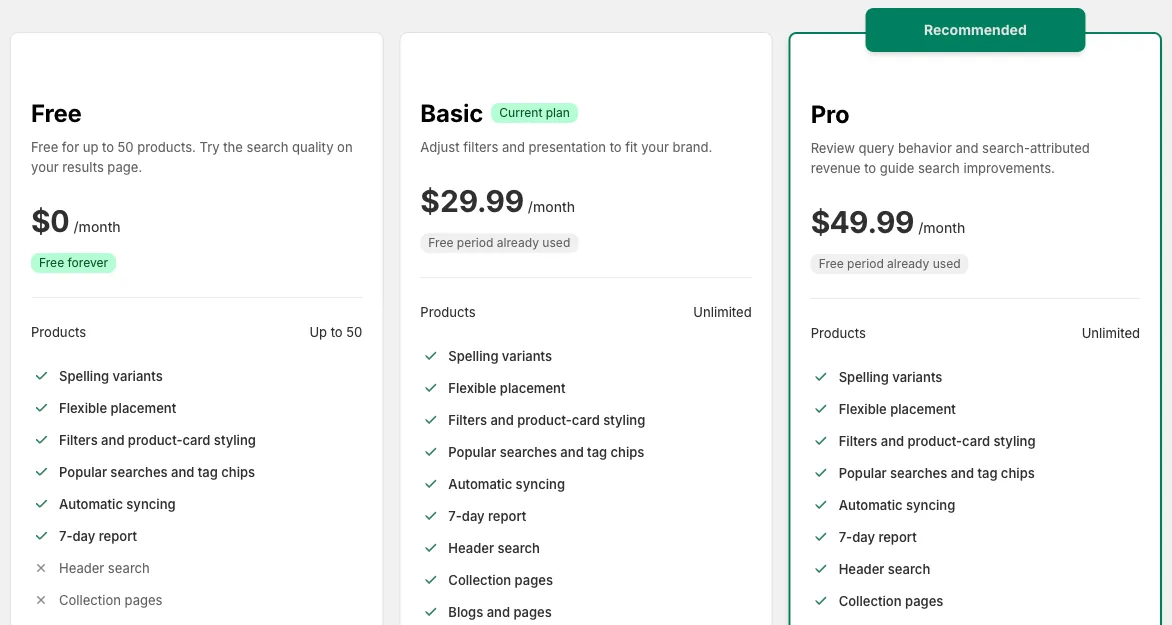
| Plan | Per month | Products | Best for stores that |
|---|---|---|---|
| Free | $0 | Up to 50 | Have few products and want to try the search results page first |
| Basic | $29.99 | Unlimited | Also want header search, collection filters and reviews |
| Pro | $49.99 | Unlimited | Want to read their search data and fix results with search rules |
What each plan can do is listed in the table at the start of the setup guide.
The free period
- You can try Basic and Pro with a 14-day free period
- The free period can be used only once, across Basic and Pro. If you switch to Pro after using it up on Basic, charges start right away
- While you have free days left, the button reads like "Try Pro with a 14-day free period"
Change your plan
- On the "Plan" page, click the button for the plan you want
- Shopify's approval screen opens. Check the details and approve
- Back in the app, you can use the new plan
Buttons such as "Upgrade to Pro" on other pages of the app lead to the same approval screen. After you approve, you return to the page where you clicked the button.
Switch back to Free
You can cancel your paid plan with "Switch to Free" on the "Plan" page.
- If your store has more than 50 products, its search goes back to Shopify's standard search
- Search rules you made on Pro stop being used, but they're kept for 90 days. If you go back to Pro within that time, you can use them again
Development stores
On a development store, plans use test charges and nothing is billed. Once your store goes live, choose your plan again.
Next: Troubleshooting